Pages

2 April 2019

SWAYAM PRABHA: Free DTH channel for education


The SWAYAM PRABHA is a group of 32 DTH channels devoted to telecasting of high-quality educational programmes on 24X7 basis using the GSAT-15 satellite. This project ia part of the Digital India initiative.  Every day, there will be new content for at least four hours which would be repeated five more times in a day, allowing the students to choose the time of their convenience. The contents are provided by National Programme for Technology Enhanced Learning ( NPTEL ), all Indian Institute of Technology , University Grands Commission, Consortium for Educational Communication ( CEC ), Indira Gandhi National Open University ( IGNOU ), National Council for Educational Research and Training ( NCERT ) and National Institute of Open Schooling ( NIOS ). The INFLIBNET Center maintains the web portal of SWAYAM PRABHA.

SWAYAM PRABHA provide learning resources to support school, college, university education and life long learning. For school education from ninth level to twelveth level resources are telecasting. Modules are for teacher's training as well as teaching and learning aids for students to help them understand the subjects better. It also help students in preparing for competitive examinations for admissions to professional degree programmes. In the higher education level curriculum-based course contents at post-graduate and under-graduate level covering diverse disciplines such as arts, science, commerce, performing arts, social sciences and humanities, engineering, technology, law, medicine, agriculture, etc. are provided. These courses can meet the needs of life-long learners of Indian citizens in India and abroad.

Official Website of SWAYAM PRABHA: https://www.swayamprabha.gov.in/

1 April 2019

SWAYAM: MOOCs initiative of Digital India


Ministry of Human Resource Development, Government of India has initiated SWAYAM ( Study Webs of Active Learning for Aspiring Minds ) under Digital India initiative to facilitate MOOCS ( Massive Online Open Cources. The SWAYAM portal provides online learning resources and tries to reduce digital divide in the information age. The portal hosting all the courses from ninth standard to postgraduate level by eminent faculties of national institutes like IITs, IIMs, central universities, etc. SWAYAM is an opportunity for all citizen of India to do life long learning. The students of school or college or university can attend the classes of SWAYAM 24X7 and can expand the horizon of knowledge. All courses would be offered free of cost under this programme however fees would be levied in case learner requires certificate. 


SWAYAM website : https://swayam.gov.in/
SWAYAM mobile app: https://play.google.com/store/apps/details?id=in.gov.swayam.app

31 March 2019

List of MS Excel Shortcut Key


Ctrl+A - Select All Ctrl+B - Bold
Ctrl+C - Copy
Ctrl+D - Fill Down
Ctrl+F - Find
Ctrl+G - Go to
Ctrl+H - Replace
Ctrl+I - Italic
Ctrl+K - Insert Hyperlink
Ctrl+N - New Workbook
Ctrl+O - Open
Ctrl+P - Print
Ctrl+R - Fill Right
Ctrl+S - Save
Ctrl+U - Underline
Ctrl+V - Paste
Ctrl W - Close
Ctrl+X - Cut
Ctrl+Y - Repeat
Ctrl+Z - Undo
F1 - Help
F2 - Edit
F3 - Paste Name
F4 - Repeat last action
F4 - While typing a formula, switch between absolute/relative refs
F5 - Goto
F6 - Next Pane
F7 - Spell check
F8 - Extend mode
F9 - Recalculate all workbooks
F10 - Activate Menubar
F11 - New Chart
F12 - Save As
Ctrl+: - Insert Current Time
Ctrl+; - Insert Current Date
Ctrl+" - Copy Value from Cell Above
Ctrl+’ - Copy Formula from Cell Above
Shift - Hold down shift for additional functions in Excel’s menu
Shift+F1 - What’s This?
Shift+F2 - Edit cell comment
Shift+F3 - Paste function into formula
Shift+F4 - Find Next
Shift+F5 - Find
Shift+F6 - Previous Pane
Shift+F8 - Add to selection
Shift+F9 - Calculate active worksheet
Shift+F10 - Display shortcut menu
Shift+F11 - New worksheet
Shift+F12 - Save
Ctrl+F3 - Define name
Ctrl+F4 - Close
Ctrl+F5 - XL, Restore window size
Ctrl+F6 - Next workbook window
Shift+Ctrl+F6 - Previous workbook window
Ctrl+F7 - Move window
Ctrl+F8 - Resize window
Ctrl+F9 - Minimize workbook
Ctrl+F10 - Maximize or restore window
Ctrl+F11 - Inset 4.0 Macro sheet
Ctrl+F1 - File Open
Alt+F1 - Insert Chart
Alt+F2 - Save As
Alt+F4 - Exit
Alt+F8 - Macro dialog box
Alt+F11 - Visual Basic Editor
Ctrl+Shift+F3 - Create name by using names of row and column labels
Ctrl+Shift+F6 - Previous Window
Ctrl+Shift+F12 - Print
Alt+Shift+F1 - New worksheet
Alt+Shift+F2 - Save
Alt+= - AutoSum
Ctrl+` - Toggle Value/Formula display
Ctrl+Shift+A - Insert argument names into formula
Alt+Down arrow - Display AutoComplete list
Alt+’ - Format Style dialog box
Ctrl+Shift+~ - General format
Ctrl+Shift+! - Comma format
Ctrl+Shift+@ - Time format
Ctrl+Shift+# - Date format
Ctrl+Shift+$ - Currency format
Ctrl+Shift+% - Percent format
Ctrl+Shift+^ - Exponential format
Ctrl+Shift+& - Place outline border around selected cells
Ctrl+Shift+_ - Remove outline border
Ctrl+Shift+* - Select current region
Ctrl++ - Insert
Ctrl+- - Delete
Ctrl+1 - Format cells dialog box
Ctrl+2 - Bold
Ctrl+3 - Italic
Ctrl+4 - Underline
Ctrl+5 - Strikethrough
Ctrl+6 - Show/Hide objects
Ctrl+7 - Show/Hide Standard toolbar
Ctrl+8 - Toggle Outline symbols
Ctrl+9 - Hide rows
Ctrl+0 - Hide columns
Ctrl+Shift+( - Unhide rows
Ctrl+Shift+) - Unhide columns
Alt or F10 - Activate the menu
Ctrl+Tab - In toolbar: next toolbar
Shift+Ctrl+Tab - In toolbar: previous toolbar
Ctrl+Tab - In a workbook: activate next workbook
Shift+Ctrl+Tab - In a workbook: activate previous workbook
Tab - Next tool
Shift+Tab - Previous tool
Enter - Do the command
Shift+Ctrl+F - Font Drop Down List
Shift+Ctrl+F+F - Font tab of Format Cell Dialog box
Shift+Ctrl+P - Point size Drop Down List


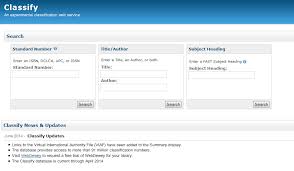
'Classify': an online tool for library classification


Online Computer Library Center is the provider of 'Classify' a web based catalogue information of books and other information sources world wide. The Classify helps librarians to ease their classification work . Only the metadata/citation is provided in 'Classify' . It provided DDC and LC classification numbers. Access Classify at http://classify.oclc.org/

Dewey Decimal Classification ( DDC ) System: Summaries

Main Classes

000 Computer science, information & general works
100 Philosophy & psychology
200 Religion
300 Social sciences
400 Language
500 Science
600 Technology
700 Arts & recreation
800 Literature
900 History & geography

For further subdivisions visit https://www.oclc.org/

27 March 2019

Project Gutenberg


Project Gutenberg offers over 58,000 free eBooks. Choose among free epub and Kindle eBooks, download them or read them online.
Visit: https://www.gutenberg.org


International Children's Digital Library


Get free e-books for children in 59 languages. Visit: http://en.childrenslibrary.org

LIS Notes for Copmpetitive Examination - 37:Books and Authors in LIS

  A Manual of Classification for Librarians:  W C B Sayers Basic Statistics for Librarians:  J.D. Brown Canons of Classification : W...